Site-specific objects
Dedicated tools, equipment signs, industrial materials and other objects with a recognisable appearance.
Custom computer vision models
Prepare field samples, train a model, inspect the errors and deploy a compatible version to your local AI device. XINHUOAI supports the model-production work; day-to-day recognition runs on the selected deployment hardware.
Use a standard algorithm where it already meets the requirement. Custom training is useful when the camera can clearly see a relevant target, but the existing model does not recognise it reliably or does not cover that target class.
Dedicated tools, equipment signs, industrial materials and other objects with a recognisable appearance.
Uniform colours, garment designs and visible protective equipment that differ from the existing model's training examples.
Observable changes in an indicator, component or work area. Confirm that the required condition is visible at the installed camera distance.
Object presence or absence, placement conditions and clearly defined actions. Temporal events may need a sequence model and rules as well as image detection.
Training cannot recover a detail that the camera does not capture. Vague intent, hidden actions or precision measurements beyond the image resolution need a different sensing method or a narrower requirement.
Send footage from the intended cameras and describe what should trigger an event. Useful coverage includes normal activity as well as the rare situations the project is meant to detect.
| Material | Include | Purpose |
|---|---|---|
| Positive examples | Visible targets at different distances, angles, lighting conditions and partial occlusions. | Represent how the target actually appears on site. |
| Negative examples | Look-alike objects, reflections, shadows, empty scenes and normal operating activity. | Test and reduce false detections. |
| Video clips | Target arrival, movement, temporary occlusion and departure, including relevant time periods. | Check continuity and event rules on real footage. |
| Scene notes | Camera height and angle, target size, detection region, schedule, event definition and intended hardware. | Connect the model task to the operating requirement. |
| Field errors | False alarms and missed events with their source camera and circumstances. | Guide the next dataset and model iteration. |
Use material you are authorised to supply. Agree data access, transfer, retention and any redaction requirements before uploading project footage.
Record target classes, expected output, camera conditions, deployment device and evaluation criteria.
Remove unusable images and redundant duplicates. Keep the source, scene and collection context of useful samples.
Check class names, target boxes or other labels. Existing models can assist with pre-annotation where suitable; people still review the labels.
Keep training, validation and final test material distinct. Avoid near-identical video frames appearing on both sides of a test.
Use GPU resources for training, then inspect precision, recall and task-appropriate metrics alongside the actual errors.
Export or convert the model, check inference performance and test the end-to-end event workflow on the intended device.
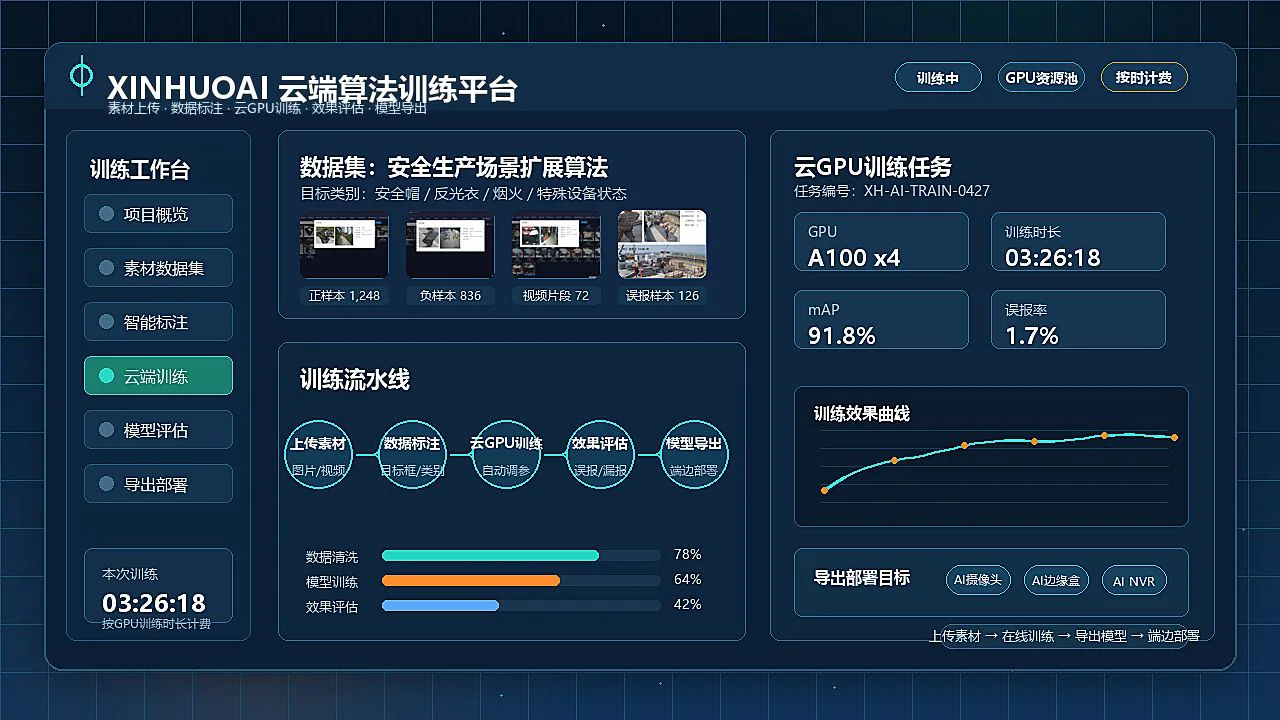
A useful evaluation explains which scenes work, which fail and under what conditions. Raising a confidence threshold may reject false detections but can also miss real targets. Review both sides before accepting a change.
Inspect class-level precision and recall, false positives, missed targets and the sample coverage behind the result. Use metrics that fit the task, such as F1 or detection mAP where appropriate.
Test the video source, model, region rules, dwell conditions, evidence capture and platform delivery together. Record nuisance alarms, missed events and response time over representative operating periods.
Keep difficult field examples for the next iteration. Repeat validation when camera position, lighting, visible targets or operating rules change.
| Target | Typical role | Compatibility checks |
|---|---|---|
| AI camera | Recognition at an individual camera point. | Model format, supported operators, device memory and inference time. |
| AI Edge Box | Local analysis of several accessible camera streams. | Model conversion, resolution, channel count and concurrent algorithm load. |
| AI NVR | Recording with supported AI events and evidence search. | Supported software version and integration with the NVR event workflow. |
| Video analytics server | Larger video workloads or project-specific model services. | GPU or accelerator support, memory, decoding capacity and service workload. |
A model export is not automatically compatible with every device. Conversion, quantisation and runtime validation may be required. Once a compatible model is deployed, local recognition does not require the training platform to remain connected.
XINHUOAI supports customer-led material upload, training tasks, result review and model export. Projects that need assistance can include data annotation, model tuning and deployment verification.
The quotation should identify the target classes, dataset work, GPU resources, deployment devices, deliverables and acceptance method. No fixed training fee or guaranteed accuracy applies to every possible scene.
Yes. Provide authorised samples from the intended cameras, including normal scenes, target examples and confusing negatives. Include an explanation of the event you need to detect.
The platform supports a customer-led workflow. Data quality, task definition and evaluation still need attention; XINHUO can scope annotation, tuning and deployment support for the project.
There is no single number for every task. Required coverage depends on target variation, classes, camera views, lighting and the difficulty of negative examples. Review representative samples before deciding the collection plan.
No. The export must match the selected runtime and hardware. Model format, operators, memory use, resolution and inference performance need validation before deployment.
No. Supported models can run locally after deployment, while the training service has its own resource and connectivity requirements. A private training deployment is a separate requirement to confirm.
Yes, through a compatible model update and validation process. Collect field errors, prepare a new dataset iteration and test the updated model before rolling it out across sites.
Project inquiry
Tell us the camera count, the events to detect and the project location. Our team will reply by email with the relevant product information and next steps.