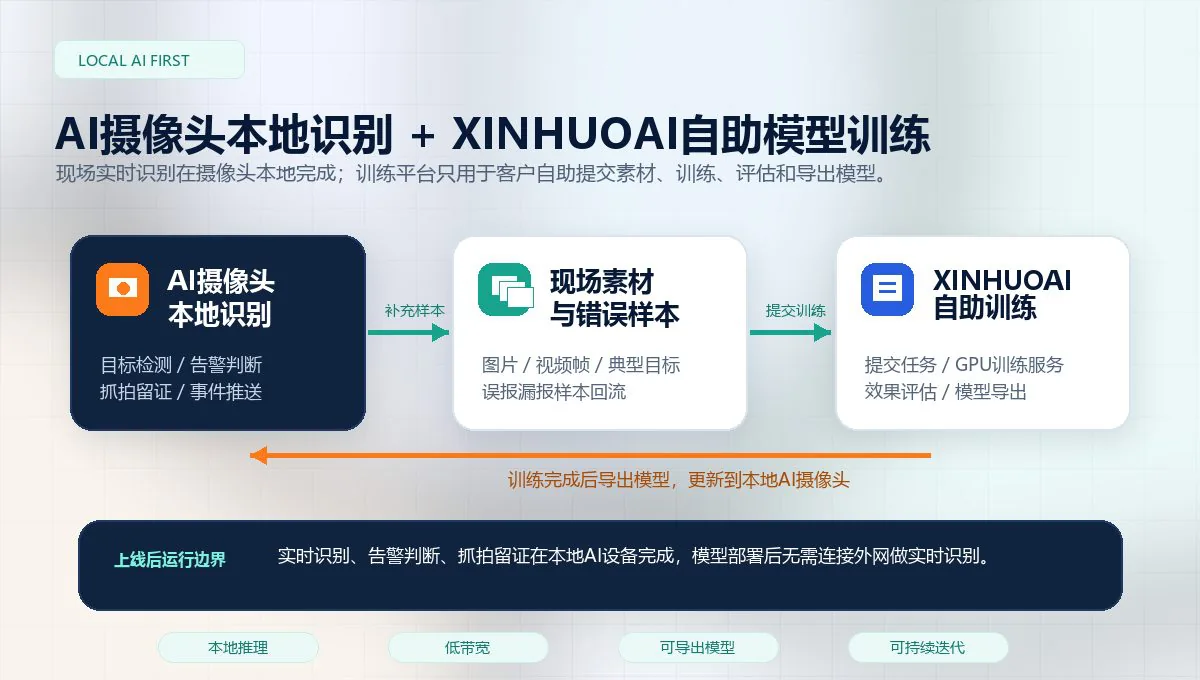
Front-end AI camera

Multi-Algorithm AI Camera for Local Video Analytics

8MP edge AI camera with an 8-core CPU and 3TOPS INT8 NPU for local multi-algorithm video analysis, alarm evidence, and custom model deployment.

The AI Camera combines image capture, local inference, rule judgment, and alarm output in one front-end device. It is suited to fixed camera points with clear detection zones, especially where sending all video to a central server would add network load or installation work.

One camera can be configured with several related tasks instead of being limited to a single generic detection. A loading-area camera, for example, may be assigned to person and forklift presence, restricted-area entry, lane occupation, smoke or flame, camera obstruction, and site-specific targets. The final combination depends on the scene, image quality, target size, and the alarm workflow. It should not be selected by a product list alone.

What multi-algorithm operation means

The camera can run up to 10 selected algorithms concurrently in a project configuration. These may cover PPE, person and vehicle behavior, fire-risk signs, visible equipment conditions, or trained vertical targets. Each task has its own region, schedule, duration rule, confidence setting, and alarm interval. A camera does not need every available model enabled. The useful configuration is the smallest set that answers the risks at that point.

The device produces event records locally. Depending on the integration, an event can include the camera name, event type, time, snapshot, full-scene image, detection region, and user-defined fields. Events can be reviewed locally or sent to a customer platform through HTTP or other supported interfaces.

Optional Multimodal Second Review

For alerts that remain difficult to judge from a first-pass detection, the event snapshot, full-scene image, event type, detection region, and rule context can be passed to a multimodal AI model for a second review. The camera still handles real-time detection locally. The review layer is used only for selected alarm evidence, helping reduce false alerts caused by visually similar objects, lighting, or actions.

Practical Site Review

Before deployment, confirm camera height, viewing angle, image clarity, target pixel size, detection region, stream stability, and acceptance criteria. Targets that are too small, heavily backlit, blocked, or blurred require a change in lens, point position, lighting, or deployment mode. More compute cannot recover details that the camera never captured.

Typical Front-End Scenarios

Common deployments include factory compliance points, gas stations, warehouse gates, equipment rooms, fire lanes, kitchens, parks, unattended outdoor points, water-conservancy sites, farms, oil fields, and material yards. The same product can serve very different scenes because the configuration follows the camera point rather than a fixed industry template.

Relationship with Custom Training

When a site needs special workwear, equipment states, unusual vehicles, signs, objects, or actions that are not covered by a standard model, the XINHUOAI workflow can train and export a model for local operation on the camera. Field images and video frames are needed because the model must be evaluated against the actual camera angle, light, distance, and occlusion.

Specifications

Key technical information.

AI compute3TOPS INT8 NPU with 8-core CPU by project configuration
Image capture8MP high-definition capture for more target detail than common 2MP or 2K front ends
Algorithm capacityUp to 10 selected algorithms on one camera, subject to model mix, video conditions, and project configuration
Local backendBuilt-in web interface for preview, algorithm parameters, alarm records, and device operation
Runtime networkModels run locally after deployment; daily recognition does not require external internet
Model updateRemote model update and XINHUOAI custom training integration available

Front-end AI deployment

When a front-end AI camera is the practical option

An AI camera suits new or dispersed camera points where a separate edge appliance, NVR access, or continuous video backhaul would add unnecessary work. The camera performs the first-stage analysis at the point of capture and can return selected events instead of relying on continuous cloud video transfer.

Choose views that answer one operating question

A camera can observe several related events in the same view, such as PPE, smoke, intrusion, vehicle movement, and an occupied access route. The useful combination depends on what is visible together. A wide loading-yard view may work for vehicle direction and zone occupation, while a close work-area view is needed for a helmet, uniform, or small-object decision.

Image quality still decides the result

Before deployment, check mounting height, angle, target pixel size, lighting, shadows, glare, lens cleanliness, and night performance. License plates, hand-held objects, and distant head protection need more image detail than a large vehicle or a person entering a clearly defined area.

Use the network for the right data

Where 4G or a limited uplink is used, the design can prioritize alarm metadata, snapshots, short evidence clips, heartbeat data, and device status. The site does not need to move every camera stream to a central office in order to receive selected event information.

Keep an approval record for each scene

Capture sample images for the accepted view and document the selected models, regions, time schedules, event thresholds, and alarm recipients. These records help teams distinguish a model issue from a camera-view change after a site is altered or a device is serviced.

Related planning: Guide: 4G AI cameras for remote sites. For existing multi-camera systems with accessible RTSP or ONVIF streams, an edge box or analytics server can be evaluated alongside the camera option.

Project inquiry

Tell us your camera environment and required AI analytics.

For the first version this site uses a lightweight email-based inquiry flow. It avoids a database and keeps the English site simple until inquiry volume justifies a dedicated CRM integration.

The button opens your email client with the inquiry content filled in.