Camera access and preview
Add accessible RTSP or NVR channel streams, use ONVIF discovery where supported, and check device status. Multi-view preview helps engineers inspect the actual camera image before configuring detection.
Software and platforms
Connect cameras, configure detection rules and review alarms on your XINHUO device. For larger projects, bring sites together on a central management server and extend detection with custom models or optional multimodal review.
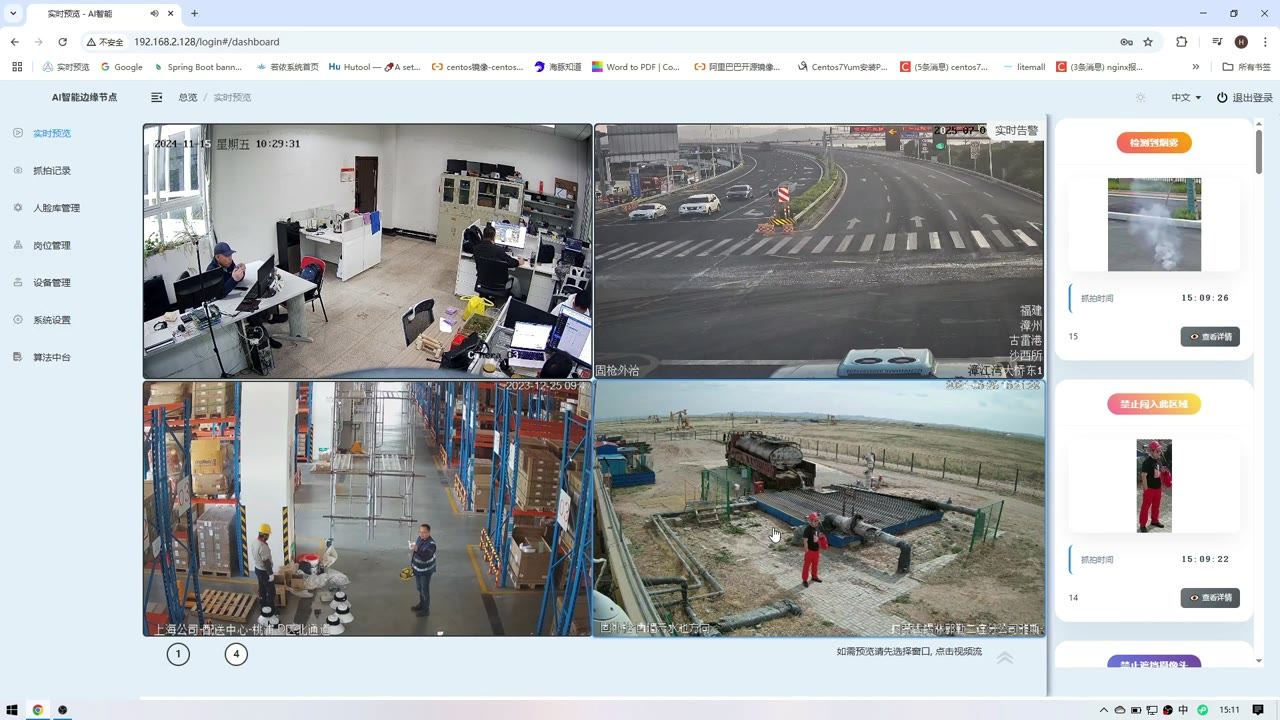
The device interface, central management service and AI model services have different jobs. A small installation can use the device's own backend; a distributed project can add central supervision without moving all recognition to the centre.
On-device operation
XINHUO AI cameras and Edge Boxes include a browser-based management interface. Open the device's IP address on the local network to configure tasks and inspect results. An additional central server is not required just to use this backend.
Add accessible RTSP or NVR channel streams, use ONVIF discovery where supported, and check device status. Multi-view preview helps engineers inspect the actual camera image before configuring detection.
Bind supported algorithms to channels and draw detection regions or direction lines where applicable. Set the operating schedule and event conditions for each scene.
Search captured events by device, algorithm and time. Review the event image, full-scene context and timestamp before deciding what action is needed.
Inspect available CPU, accelerator, memory, storage and task-status information. Logs and restart controls help distinguish video-source issues from processing or configuration faults.
Available controls depend on the device, algorithm and delivered software version. Camera stream access, image quality and simultaneous algorithm load should be checked during commissioning.
Multi-site projects
For factories, service stations, branches or distributed sites, XINHUO can deploy a central management platform on a local or customer-designated server. Operators can manage devices by project, region, site, node and channel while recognition continues on the local AI devices.
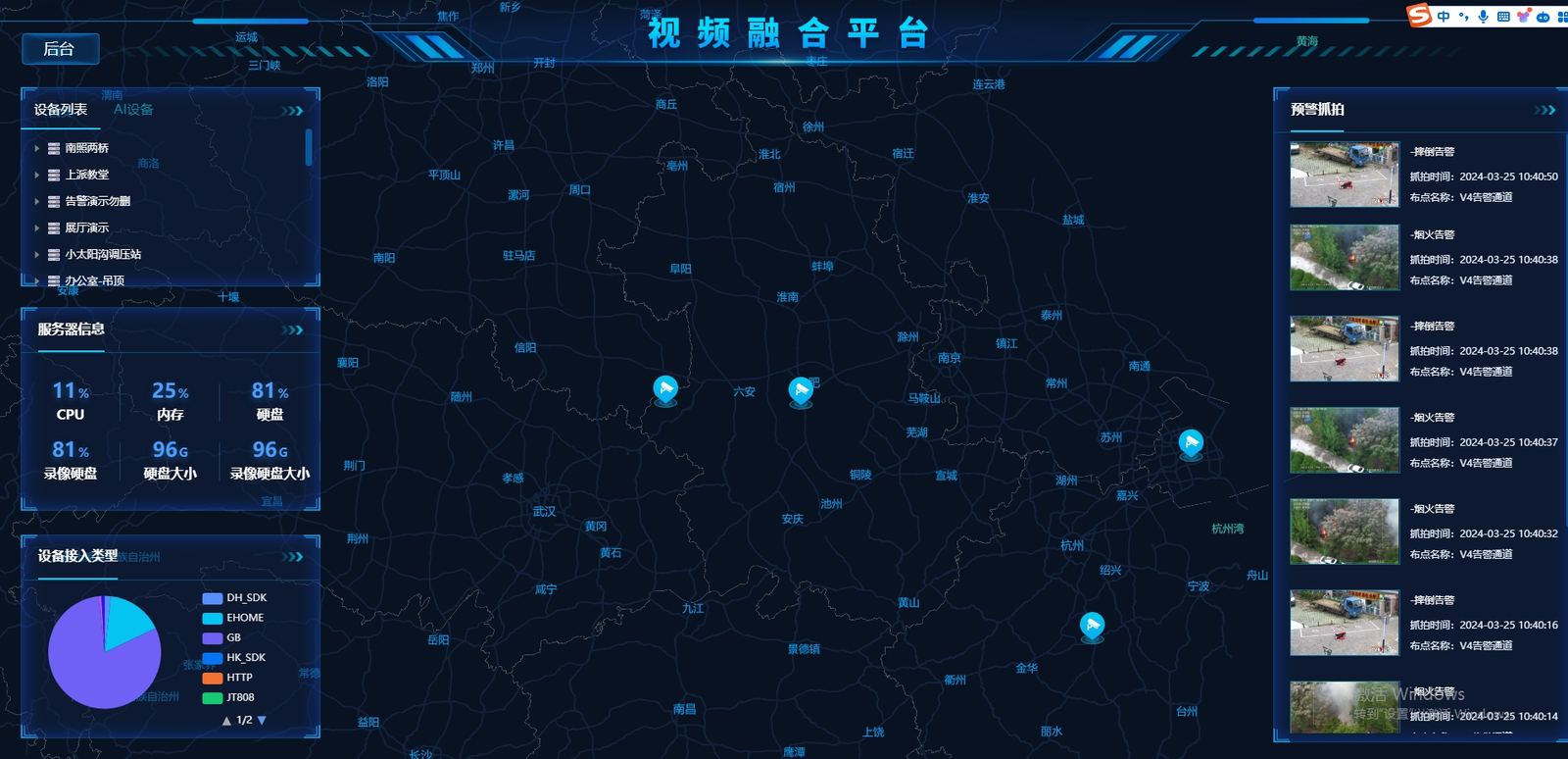
Head-office users can view the overall project. Regional users can be limited to the devices, previews and evidence within their authorised scope.
Check online status, import devices, pause or resume rules, and review events across sites. Shared event records help engineers locate the affected camera and configuration.
Plan server capacity around device count, concurrent previews, event volume and retention. Live viewing needs video bandwidth; metadata and snapshots have a different traffic profile. Central management is a project deployment, not an unlimited cloud subscription included with every device.
Field configuration and validation
A model score alone does not tell an operator whether an alarm needs attention. XINHUO combines scene-specific models with configurable rules, evidence review and field iteration to improve detection accuracy and reduce nuisance alarms.
| Control | Practical use | What to verify |
|---|---|---|
| Region and direction | Restrict intrusion or line-crossing detection to the relevant entrance or work area. | Check the boundary against normal pedestrian and vehicle routes. |
| Schedule and duration | Apply rules during the required hours and use dwell conditions for applicable events. | Test both brief normal activity and an event that should trigger. |
| Target size and confidence | Filter detections that do not meet the configured size or confidence criteria. | A stricter threshold can also miss real events; review both outcomes. |
| Alarm interval | Reduce repeated notifications from a continuing event. | Retain enough evidence to recognise a new or recurring incident. |
Check the view and choose the rule that matches the operating requirement.
Keep false alarms, missed events and difficult examples with their camera context.
Change the rule when it is a configuration issue; add training data when the model needs improvement.
Compare precision, recall and event-level results on separate, representative footage.
Results depend on camera position, visibility, lighting, scene coverage and the agreed event definition. Model updates and multimodal review need field validation; neither is a guarantee of zero false alarms.
Optional GPU service
The first-stage detector monitors the video. For supported events, a multimodal model can then examine the captured image, wider scene, event type and configured rule before the result goes to an operator or business system.
GPU memory, image size, model selection and the number of simultaneous candidate events affect review latency. Size the review service separately from camera stream decoding and first-stage analytics.
Agree how inconclusive results and review-service failures should be handled. A second-stage model can help reject some nuisance alarms, but should not silently turn uncertainty into a confirmed safe result.
A suitably configured local GPU server can host the review service. Sharing it with central management requires resource assessment. This option is not built into every Edge Box and does not mean a large model watches every frame of every camera.
XINHUOAI
A site may use a particular uniform, tool, warning sign or piece of equipment. XINHUOAI provides a workflow for preparing samples, training a model, reviewing errors and exporting a compatible version to the deployment device.
Specify the visible target, camera conditions, event rule and intended hardware.
Include target examples, look-alike negatives and normal activity from the actual site.
Review labels, remove unusable duplicates and separate training, validation and test material.
Run the model-training task and retain the dataset and configuration used for that iteration.
Inspect false positives and missed detections alongside the relevant performance metrics.
Check conversion, device performance and real-video alarm behaviour before rollout.
Supported deployment targets include AI cameras, Edge Boxes, AI NVRs and video analytics servers, subject to model and hardware compatibility. Training resource charges and optional annotation, tuning and deployment services are quoted separately from the selected hardware.
API and project integration
Use HTTP or MQTT event delivery to connect the AI layer with a customer dashboard, safety platform or other application. The current event message reference is V2.3.2; integrations should follow the documentation for the delivered software version.
Integrations can use event type, time, device or channel information and supported image evidence. Confirm the fields and evidence format needed for each algorithm.
During integration, verify endpoint reachability, authentication, event mapping and duplicate handling. Agree the required behaviour during network interruption and recovery.
Project cooperation can include customer branding and platform integration. Confirm logo, domain, account structure, language and software delivery scope in the quotation.
Alarms can feed a customer's response workflow. Interfaces to VMS, access control, public address or industrial equipment need project-specific integration; an event API alone is not a certified safety interlock.
English PDFs are concise references. The full Chinese manuals and current version notes remain available in the resource centre.
Product demonstrations
These are the original Chinese demonstration videos. They show the operating interface and captured results; project functions and interface language follow the agreed delivery scope.
Camera previews, detection results and event snapshots from the local analytics software.
Camera setup, algorithm configuration, captured records and routine system operation.
No. XINHUO AI cameras and Edge Boxes include their own browser-based backend. A central management server is an additional deployment for shared supervision, not a prerequisite for local device operation.
Supported models run on the local AI device after deployment. Local operation still needs the camera stream and local network where applicable. Remote management, external event delivery and any externally hosted review or training service need their respective connections.
Yes. Project deployments can group devices and channels by site or region and limit accounts to authorised data. Server sizing depends on device count, concurrent previews, event volume, storage and network conditions.
No. Training creates or updates a model for later deployment. Multimodal review uses an already deployed model to examine candidate alarm evidence during operation. They have different workloads and deployment requirements.
Yes, through the supported event interfaces and an agreed integration scope. Use the current API reference to map events and evidence into your software, then test delivery with the actual device version.
No. Start with the supported standard algorithm and configure it for the camera view. Custom training is appropriate when a visible target or scene is not covered adequately and suitable labelled samples can be collected.
The product includes its specified device software. Central management deployment, GPU hardware or model services, custom training, annotation, OEM work and third-party integration must be identified in the quotation. Do not assume the platform overview means every option is included.
Project inquiry
Tell us the camera count, the events to detect and the project location. Our team will reply by email with the relevant product information and next steps.